Spacebar Clicker Tips: 12 Ways to Grow Your Office Faster
Every game of Spacebar Clicker starts the same way: one old phone, eight empty slots and a big “Press Spacebar!” prompt. What happens next is up to you, and a few smart choices early on can save you hours later.
These 12 tips are for new and returning players alike. They’re based on how the game actually works today, from your very first upgrade to the late-game systems, so you can skip the guesswork and spend more time watching your office grow.
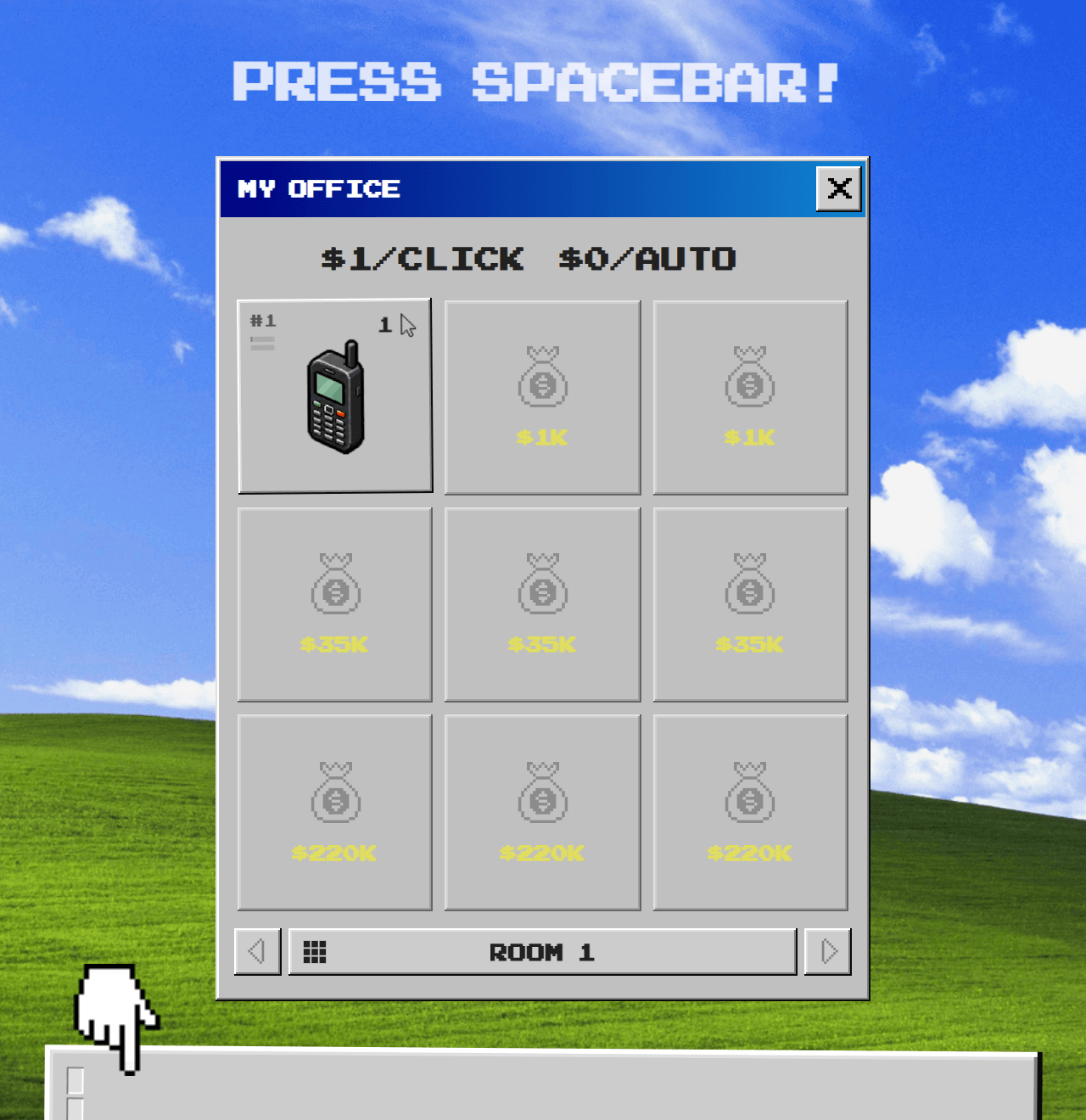 Where every run begins: one free phone, $1 per click and a room full of empty slots.
1. Get your first automatic income fast
At the start, each press of the space bar earns $1 and your office earns $0 on its own. The single most important early goal is changing that second number.
Open your phone and look at its upgrades. Most levels give you a choice: a click button that adds to every press, or an auto button that adds to what the device earns on its own each production cycle. Your first phone level costs $135. Putting some of your first levels into auto means the phone starts paying you even when your hands are off the keyboard, and that money compounds from then on.
A good rule for the first few minutes: alternate. A click level makes your presses stronger now, an auto level keeps earning forever.
2. Don’t ignore the cooler
Next to the Phone part sits a Cooler. Its first level costs just $70, and besides adding automatic income it can speed up the phone’s production cycle. The phone starts on a 7-second cycle, and each level put into time makes it a little shorter.
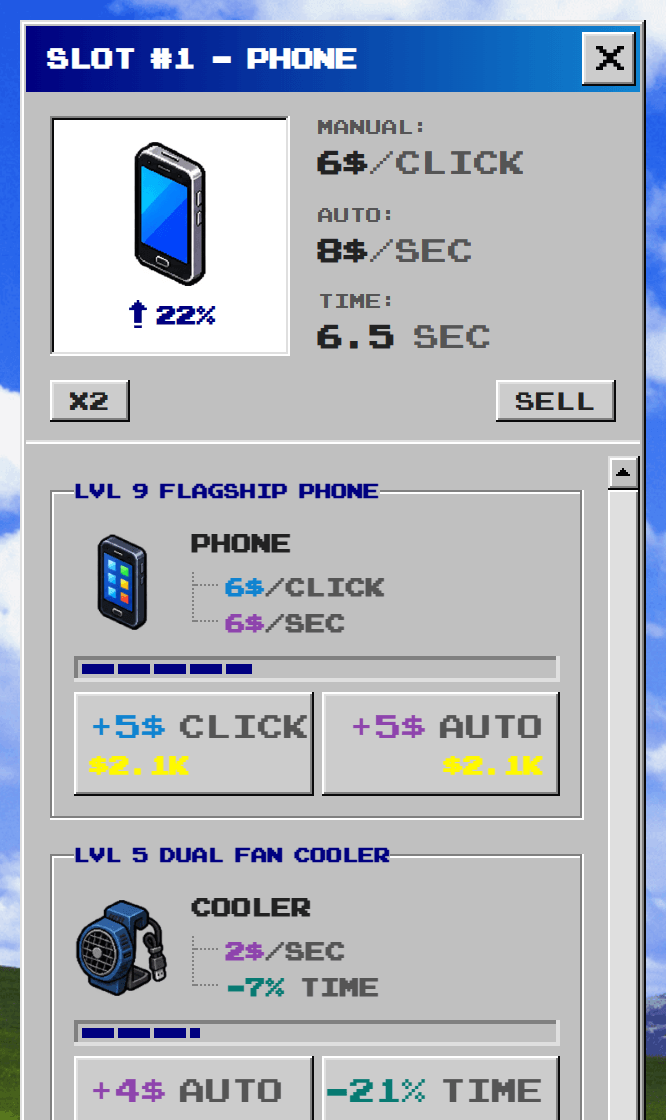 An early phone. The cooler’s time button makes every automatic payout arrive sooner.
A shorter cycle means more payouts per minute from everything that device earns automatically. It’s one of the most underrated upgrades in the early game.
3. Fill your cheap slots first
Your first room is a 3 by 3 grid. The free phone sits in slot one, and the other slots have to be bought before you can put devices in them. Slot prices depend on the row:
| Row | Slot price |
|---|---|
| Top row | $1,000 |
| Middle row | $35,000 |
| Bottom row | $220,000 |
The two $1,000 slots are among the best deals in the game. Buy them early, fill them, and you’ve tripled the number of machines working for you.
4. A second phone is cheaper than you think
Your first phone is free. A second one costs $610, and each further copy of the same device costs 22% more than the last. Two well-upgraded phones carry you comfortably through the opening minutes.
You’ll find every device in the New Device menu that opens when you click an empty slot you’ve already bought. It shows current prices and what you need to unlock the locked ones. Our guide to every device covers each one in detail.
5. Save for a laptop at $4,000
The laptop is your first big step up. Its starting level adds $5 to every press, five times what your free phone gave you, and its Display part only boosts clicks. If you enjoy active play, a laptop makes every burst of clicking feel much stronger.
After that, the PC at $23,000 is where automatic income takes over: its starting level goes straight into auto, and it has ten parts to level.
6. Click in fast bursts, not slow taps
Next to the big Spacebar button is a five-bar speed meter. The faster you press, the more bars fill up and the more every click is worth: x1.3 at 4 presses per second, x2 at 12, and x4 at 19, when all five bars turn red.
The meter averages your speed over about a second and a half, so short, fast bursts are the way to go. Rest two or three fingers on the space bar and drum them in turn. Ten seconds at x4 is worth far more than a minute of slow tapping. Our post on how fast you can click has more tips for raising your speed.
One thing to know: the game stops counting presses above 20 per second, so auto clickers and spam clickers don’t help. Real fingers at top speed are the fastest way to earn.
7. Use Click Boost for big payouts
Hold the space bar for a moment and you’ll start Click Boost, a timing minigame. A needle sweeps across a bar, and you press to stop it inside a target zone. Every hit grows a multiplier, starting at x3 and going as high as x2000. Every miss costs one of three hearts. When the round ends, your next click pays out at the multiplier you built.
The best time to use it is when your click income is high, for example right after buying click upgrades or a new laptop. The bigger your normal click, the bigger the boosted one.
8. Change the buy amount when you’re rich
The small x1 button next to Sell controls how many levels you buy per press. It cycles through 1, 2, 5, 10 and Max. Early on, x1 or x2 keeps your spending careful. Later, when you have money to burn, Max buys every level you can afford in one press and saves a lot of clicking.
9. Collect your achievements
Spacebar Clicker has 110 achievement levels across 11 tracks, from total clicks and money earned to devices owned and fully built PCs. Every level comes with a cash reward, but you have to collect it with a button in the Achievements window.
Open the Start menu and check Achievements regularly. Uncollected rewards are free money sitting on the table, and early on they can pay for your next device.
10. Work toward the unlocks
The later devices have to be unlocked:
- Servers ($23 million) appear after you own three PCs.
- Miners ($1.275 billion) appear after you own three servers and buy a Mining license for $355 million.
Each unlock is a big jump in earning power, so keep the next one in mind when you spend. Getting your third PC is a goal worth planning around.
11. Spend before you close the game
Your devices keep earning while the game is closed, for up to 24 hours. When you come back, a message tells you how much you made while away.
To make the most of it, spend your money before you leave, and lean toward automatic income and faster cycles. Money in your balance earns nothing overnight. Money in auto levels earns for hours. Coming back each morning to a big payout and spending it right away is one of the fastest ways to grow.
12. Enhance maxed-out parts, and don’t panic on fails
When a part reaches its maximum level, an Enhance button appears. Each successful attempt adds a star and multiplies everything that part earns, up to eleven stars and x10. The first star has a 90% chance. The last has 10%.
The good news is that a failed attempt only costs that attempt’s money. You never lose stars you already have, and each attempt also has a small chance to jump two stars at once. Your free phone is usually the first part you’ll max out, which makes it a perfect place to try your luck. Our Enhance guide has the full odds and costs.
Bonus: small things that help
- Sell to rebuild. Selling a device or part returns 70% of what you spent, which is handy when you want to replace an early device with a stronger one. Money spent on Enhance attempts isn’t refunded, though.
- Name your rooms. When you expand beyond your first room, giving each room a name makes a big office much easier to manage.
- Sign in for cloud saves. It’s optional, but it lets you continue your office on another computer or your phone, and puts you on the leaderboard.
- Pick your soundtrack. The Media Player in the Start menu has six tracks to keep long sessions fresh.
Quick answers
What should I buy first in Spacebar Clicker? A few phone levels, with some going into auto income, then the cooler and the two $1,000 slots.
Should I put levels into click or auto? Both. Clicks help when you’re actively playing, auto keeps earning while you’re away. Early on a mix works best, and later automatic income does most of the work.
Do auto clickers work? No. The game ignores presses above 20 per second, so fast real clicking is the way to go.
How do I unlock servers and Miners? Own three PCs to unlock servers. Own three servers and buy the Mining license to unlock Miners.
Put the tips to work
The fastest way to learn is to play. Open Spacebar Clicker, press the space bar for your first $135, put a level into auto and see how quickly your office takes off. When you’re ready to plan further ahead, our device guide shows what each tier costs and earns.