Is Spacebar Clicker Unblocked? Play at School or Work
If you have ever typed “spacebar clicker unblocked” into a search bar on a school Chromebook or a work laptop, you already know the problem. A lot of browser games want a download, a plugin, an app store, or a login before you can press a single key. Those are exactly the things a managed computer tends to say no to.
Spacebar Clicker was built the other way around. It is a small idle clicker that opens in a normal browser tab and starts working the moment the page loads. This post explains what “unblocked” actually means, what Spacebar Clicker needs (and doesn’t need) to run, and how to get going in under a minute.
What “unblocked” actually means
“Unblocked games” is the name people use for browser games that still open on a restricted network. Schools and offices usually run some kind of web filter. Those filters sort websites into categories, and anything that looks like a big gaming portal, a game launcher, or a download site often lands in a blocked category.
So when people search for an unblocked version of a game, they are usually looking for one of two things:
- A game that doesn’t need anything installed, because they can’t install software on that computer.
- A game on a site that isn’t on the blocked list, because the filter is deciding by website, not by game.
Spacebar Clicker handles the first part completely. The second part depends on your network, and it is worth being honest about that, so there is a section on it below.
What you need to play Spacebar Clicker
The short answer is: a browser.
- No download. The game is a web page. There is no installer, no
.exe, and nothing to unzip. - No plugins. It doesn’t use Flash, Java, or any browser extension. It runs on the same web technology as any modern site.
- No admin rights. Because nothing gets installed, you never hit an “ask your administrator” prompt.
- No account. You can play right away. Signing in is optional and only matters if you want your best scores on the leaderboard.
- No app store. On a phone or tablet you just open the page, the same as on a computer.
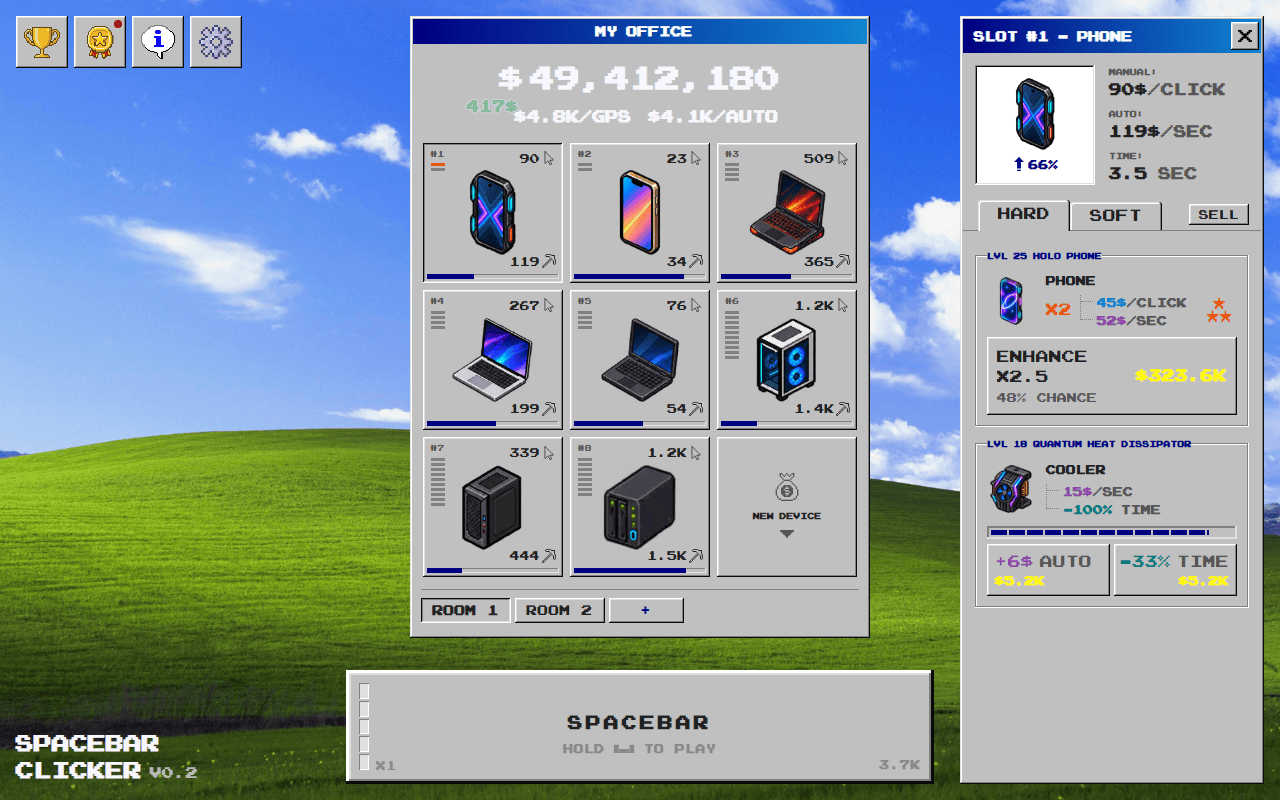 The whole game, money counter, devices and upgrades included, runs inside one browser tab.
That makes it a good fit for the kind of computer where you can open websites but can’t change much else, which is most school and work machines.
Does it work on a school Chromebook?
Chromebooks are the most common school computer, and they are built around the browser. Since Spacebar Clicker is just a web page, there is nothing about it that a Chromebook can’t run. You don’t need the Play Store, Linux apps, or developer mode.
The only thing that can stop it is the network filter, which is a separate question from the device. If your school’s filter allows the site, the game runs on the Chromebook the same way it runs anywhere else.
Will my school or work network allow it?
This is the part nobody can promise you, and you should be wary of any site that does.
Whether a website opens on a managed network is decided by whoever runs that network. Their filter checks each site against its own lists and categories. Filters tend to block big gaming portals and download sites first, and Spacebar Clicker is neither. But your network might still block it, or block every game, and that is the network owner’s call.
A few practical notes:
- If the page loads, the game itself will work. There is no installer or launcher step that could get stuck.
- If the page doesn’t load, it is the filter, not your computer.
- Please don’t try to get around a school or company filter with proxies or VPNs. It can break the rules you agreed to when you were given that computer or network access, and a clicker game is not worth that. Play on your break, on your own device, or at home instead.
How to start playing in under a minute
- Open Spacebar Clicker in your browser.
- Press the Space key, or tap or click the big Spacebar button at the bottom of the screen. Each press earns money.
- When you have enough, upgrade your phone in the window on the right. Each level you buy adds either to your Click income or to your Auto income, which keeps coming in when you stop clicking.
- Buy new slots in the My Office grid and put more devices in them: laptops, PCs, and later servers.
That’s it. There is no tutorial wall, no sign-up screen, and no loading bar that asks for permissions.
If idle games are new to you, our beginner’s guide to idle clicker games explains how the genre works and why it fits so well into short breaks.
Playing on a phone or tablet
Spacebar Clicker works on mobile as well. The layout changes to fit a narrow screen: the device grid sits on top, the big button sits underneath, and the menu moves to the bottom of the screen where your thumb can reach it.
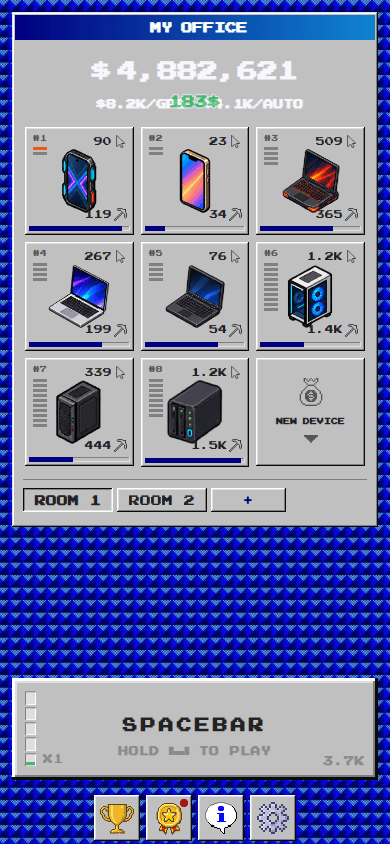 On a phone you tap the big button instead of pressing Space.
On a phone you tap the button instead of pressing a key. Everything else, including upgrades, achievements, and the leaderboard, works the same way.
Is your progress saved?
Yes, automatically. Your money, devices, upgrades, and achievements are saved in your browser as you play, so you can close the tab and pick up where you left off next time.
There are two things to keep in mind, and both matter more on a shared or school computer:
- Progress is tied to the browser you played in. If you switch to a different computer or a different browser, you start fresh there.
- Private or incognito windows don’t keep it. Many school computers also clear browser data when you log out. If that happens, your save goes with it.
Signing in puts your best scores on the public leaderboard, so they’re kept even if a browser forgets your local save.
It keeps earning while you’re away
This is the part that makes an idle game a good match for a school day or a workday. Once you’ve put some upgrades into Auto income, your devices keep earning while the tab is closed. When you come back, the game adds up what your devices made while you were gone and shows you the total.
Offline earnings count for up to 24 hours. That means you can play for five minutes at lunch, close the tab, and come back after class or after work to a pile of money waiting to be spent.
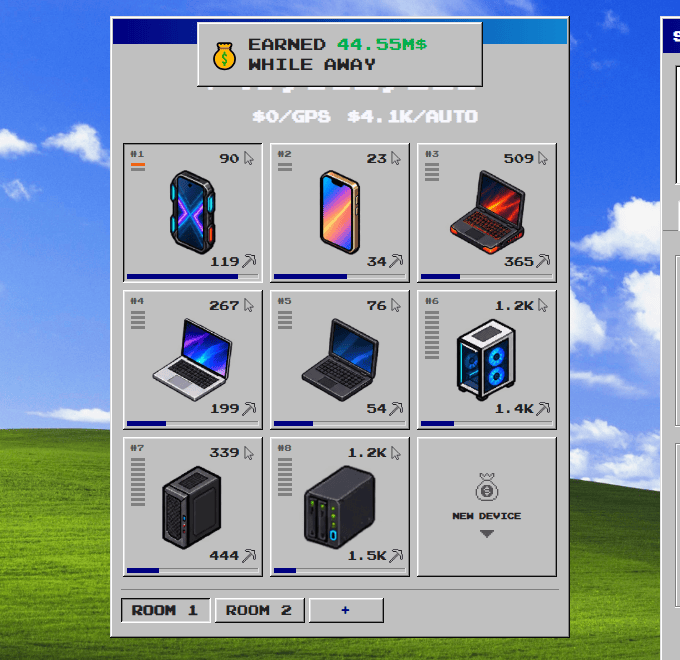 Coming back after a few hours: the game adds up what your devices earned while the tab was closed.
Why a small browser game suits short breaks
Big games want long sessions. You need to load in, find your place, and settle in before anything happens. An idle clicker is the opposite:
- Every session is useful, even a short one. Thirty seconds of clicking and one upgrade is real progress.
- It’s fine to stop at any moment. There is no match to finish and no team waiting on you.
- It runs light. It is a single tab, so it doesn’t need a gaming PC or a fast connection to stay smooth.
- It’s quiet when it needs to be. Music and sound effects each have their own switch in Settings, so you can mute everything with two clicks.
What there is to do once you’re going
Clicking is only the start. As you earn more, the game opens up:
- Devices. You begin with a phone, then work up through laptops, PCs, and servers. Each one earns more than the last.
- Components. Every device has parts you can upgrade one level at a time, from the device itself to coolers and other hardware.
- Rooms. When your office fills up, you can open more rooms, each with its own grid of device slots.
- The Gainer. Clicking fast fills a meter that multiplies every click, up to x4.
- The Booster. Hold the button to start a timing minigame. Every well-timed hit raises a multiplier, every miss costs one of three lives, and your next click after the round pays out at the multiplier you reached.
- Achievements. There are 11 achievement tracks with 10 levels each, and every level gives a money reward you can collect.
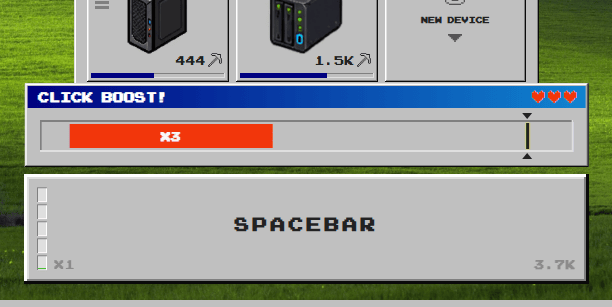 The Booster: time your hits to push the multiplier up before your three lives run out, then cash it in with one click.
There is enough depth to keep you coming back, but you never need to learn any of it before you start. You learn it by playing.
Quick answers
Is Spacebar Clicker free? Yes. It’s free to play in your browser.
Do I need to download anything? No. It runs as a web page, with nothing to install.
Do I need an account? No. You can play straight away. Signing in is optional and puts your best scores on the leaderboard.
Does it work on Chromebooks? Yes, as long as your network allows the site.
Can I play on my phone? Yes. Tap the big button instead of pressing Space.
Will I lose my progress? Only if your browser’s data gets cleared, or if you play in a private window or on a computer that resets when you log out.
Try it now
Spacebar Clicker needs nothing but a browser tab, which is about as unblocked as a game can be. Whether your network lets the site through is up to the people who run it. If it does, you’re one click away from your first upgrade.